Introduction
Quick Start
Basic Concepts
Understanding Routing
Intercepting Requests
Module Fundamentals
Database Operations
Templates
Helpers
Form Handling
Form Validation
Working With Files
Image Manipulation
Working With Dates & Times
Language Control
Security
Tips And Best Practices
Killed It
Using Debug Mode
The db module ships with a built-in Debug Mode.
Flip one switch → raw SQL dumps straight to your screen. No logs. No var_dump hell. Just the truth.
Enable It. Own It.
- Open
modules/db/Db.php - Find
private $debug = false; - Make it
true
private $debug = true;Done. Every query now screams at you.
What You’ll See
Run any $this->db method → a big yellow box appears before your normal output, showing the exact SQL before PDO binds the parameters.
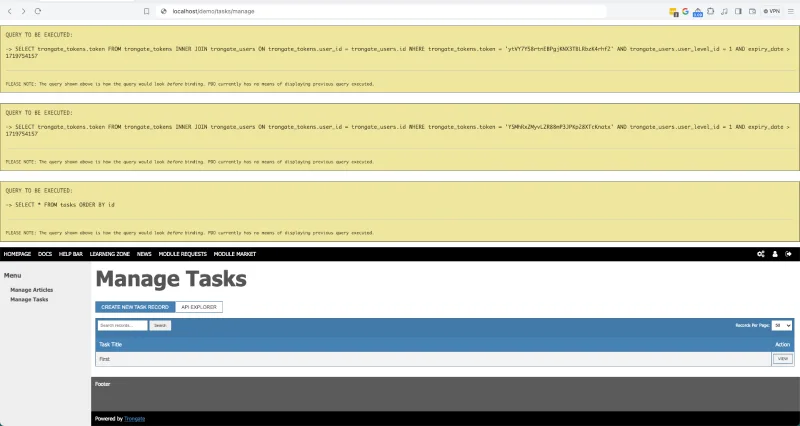
Real Example
Let’s say you have this controller method:
public function test() {
    $rows = $this->db->get('id', 'users');
    json($rows); // pretty-print the result as JSON
}
Visit the URL → here’s what happens:
Debug OFF
You only see the nicely formatted JSON (thanks to Trongate's json() function)
[
    { "id": 1, "first_name": "Alice", "email_address": "[email protected]" },
    { "id": 2, "first_name": "Brian", "email_address": "[email protected]" }
]
Debug ON
First you get the yellow debug box:
-> SELECT * FROM users ORDER BY id
…then, immediately after, the exact same pretty JSON as before.
json() doesn’t care that Debug Mode is on - it still outputs the data perfectly.
Pro tip: In API methods, use json($data, true) to dump the JSON and stop the script instantly. Debug Mode will still show the SQL first - perfect for troubleshooting.
Why This Rules
- See every query before it runs.
- No log files. No external tools. No nonsense.
- Works with all db methods.
- Turn it off in production → one line → gone.
Never ship with $debug = true unless you enjoy giving away your schema for free.
We're continually improving the Trongate documentation. If anything is incorrect, unclear, incomplete, or could be better, we'd genuinely appreciate your input.
Share your thoughts in the Documentation Feedback.